 Recent
Entries
Recent
Entries
Setting up Xubuntu in Lenovo Flex2 14D
How to beat workday blues?
Bangalore Coonoor on Royal Enfield
Bash infinite loop script
Remove duplicate jars
Quick Ref: Linux Mint 11 #1
Quick Ref: SVN command line
Git with Dropbox
Quick Start: Git for personal use
Quick script to maintain a diary
Blogroll: Other sites I read.
Archives
Categories: with XML
Monthly
| September 2014 | ||||||
|---|---|---|---|---|---|---|
| Sun | Mon | Tue | Wed | Thu | Fri | Sat |
| 1 | 2 | 3 | 4 | 5 | 6 | |
| 7 | 8 | 9 | 10 | 11 | 12 | 13 |
| 14 | 15 | 16 | 17 | 18 | 19 | 20 |
| 21 | 22 | 23 | 24 | 25 | 26 | 27 |
| 28 | 29 | 30 | ||||
Disclaimer: These are my personal views, opinions and experiences. These do not reflect the views or experiences of any of my employers or clients.


Setting up Xubuntu in Lenovo Flex2 14D
Lenovo Flex2 14D is a good laptop with decent build quality, light weight, 14" screen and touch screen for those who like it. With AMD A6 processor version, it is reasonably priced too.
It comes pre-loaded wth Windows 8.1 and a bunch of Lenovo software. If you want to get this to dual boot with Ubuntu Linux, here are the specific fixes you need to do.
More »August 15, 2014
How to beat workday blues?
Let us face it - all of us feel like having achieved or done very little after spending a long day away from family. Then you look back and find that you could’ve spent some of that time with family at least!
I’ve been observing my work habits a lot and I think I have found out something that works for me.
I am summarizing these as a NOT-TODO list of 3 items. I am a software engineer by profession and by passion.
Has this worked for me? Absolutely much better than when I was not following these rules.
More »April 05, 2014
Bangalore Coonoor on Royal Enfield
Route is indicated by green icons on the map. Return was on next day, indicated by red icons. Each marker was done when I had stopped for at least a 5 minute break. Click/hover on the marker to get info and odometer reading.
Onward
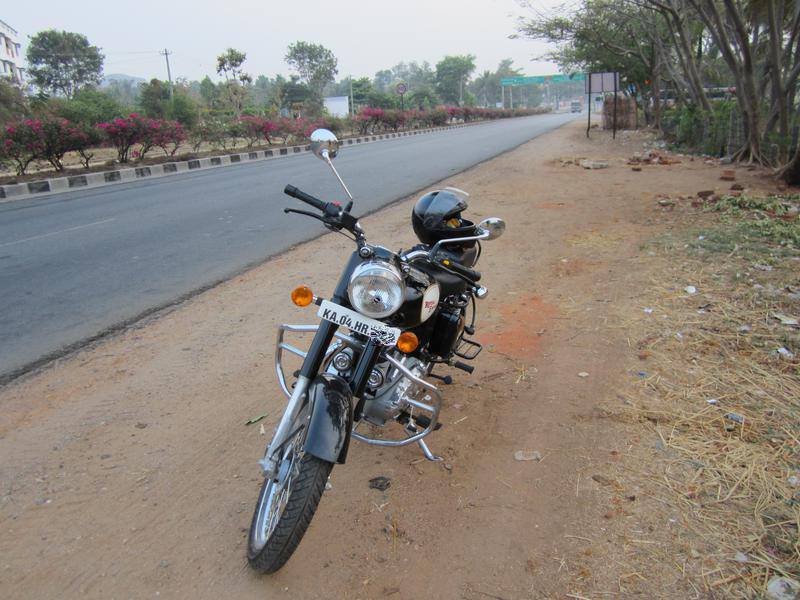
Outside Ramanagaram at 6:30am. From here till Mysore, 2 hours non-stop ride!
- Early morning traffic was peaceful. Nobody on the roads to Mysore really. Very different when you are driving on weekends though.
- Route was Sony World - Hosur Road - NICE Road - Ramanagaram - Mysore City - Nanjangud - Gundlupet - Bandipur - Theppakkadu - Masinagudi - Ooty
- Overall about 330km. Took about 8 hours with about 1.25 hours break.
- I was apprehensive of climbing the Kallatti Ghat on a relatively new bike. Just pushed it - it climbed with no drama.
- Steady speed of 60kmph was followed mostly. Once in a while, went up to 70kmph for less than 1km, just to try the bike.
- The waterhole near Bandipur visitor’s center has all the trees burned down. Quite bad. This is the place where I had seen elephants, bisons and even a tiger across the road once before.
March 31, 2014
Bash infinite loop script
There are times when cron won’t do for automated jobs. Classic example is when you need to start a script, enter some data and then get it into cron. Now, in most cases this can be handled by having env variables or config files. However, what if some one needs to enter a secret value? You don’t want that stored in the filesystem anywhere. For situations like these, you can get inspiration from the following script.
More »June 17, 2012
Remove duplicate jars
Often you will find that you’ve multiple versions of the same dependency jars in your WEB-INF/lib or your classpath directories when you are merging multiple modules. This small shell script can be run on those directories to get rid of older versions of the same jar.
#!/bin/bash
#in a directory full of jar files, it is common to have multiple
#versions of the same jars. If versions are named with only periods
#and alphanumerics, then this groups the jars by the name, deletes
#all the lesser versions

#get a list of jars like x-1.0.0.RELEASE.jar, get only the jar name
#without version or .jar and get only non unique lines (ie., duplicate
#jars are found)
for PREFIX in `ls *.jar|sed  ’s/-[0-9\.a-zA-Z]*\.jar//g'|uniq -d`; do
    echo $PREFIX
    #now do a reverse sorted listing with the jar name and remove the
    #top line so that non latest versions are returned
    for FILE in `ls -r ${PREFIX}*|sed '1d'`; do
        echo "  $FILE"
        rm -f $FILE
    done
done
August 21, 2011
Quick Ref: Linux Mint 11 #1
To force a filesystem check on root filesystem on next reboot, do:
sudo touch /forcefsck
To restore the gnome panel to defaults:
gconftool-2 --shutdown
rm -rf ~/.gconf/apps/panel
pkill gnome-panel
If clicking on any file location from say google chrome download list or other links gives an error the requested location is not a folder:
sudo apt-get remove exo-utils
Older Posts
- Quick Ref: SVN command line: There are times when you need to use SVN rather than GIT. Command line is actually much more easier for SVN than many other graphic tools. (92 Words)
- Git with Dropbox: Git'ing with Dropbox (104 Words)
- Quick Start: Git for personal use: Manual is too damn long for Git. If you've this problem, here is a quick recipe. (386 Words)
- Quick script to maintain a diary: This is easy in bash; posting it to help people stuck in Windows XP. (212 Words)
- Bicycle Diaries - I: After 17 years of deskbound job, decided to add some fitness activity to life. First scrum lessons learned. (1002 Words)
- Simple MongoDB+Java example: Starter Java code to use MongoDB. (337 Words)
- Cisco's new urbanism: Part of Orwell's 1984 is now finally happening in 2015 (39 Words)
- Labelling in Outlook 2003 ala Gmail: Extend Outlook 2003 to easily categorize mails. (279 Words)
- Quick Bazaar on Windows over SSH: Easy notes on Bazaar+sftp (176 Words)
- Do not use GET for form processing!: DON'T. Double check your form tag for explicit method="POST" (155 Words)
- Portable development links: Random links that might be useful later (20 Words)
- Wish I had this 10 years ago: Pipe Viewer via IBM dW In 1995, I got into a data warehouse project and all the ETL was... (32 Words)
- SVN client over SSH to remote Unix server from Windows: Quick notes on SVN client over SSH (470 Words)
- Associate filetypes to VIM: Life saver! (23 Words)
- Google Visualizations quick start: Pretty nice article at Jeez.eu: Google Visualizations From A To Z. Explains how to use Google's json apis, get... (43 Words)
- Nikon Coolpix 2500: White Balance Gone Outdoors: I've an old Nikon Coolpix 2500 digital camera. It has just 2.0 Mpixel and 3x Zoom - really low... (147 Words)
- SCM backed blogging - part II: NanoC! (37 Words)
- Austerity?: Politicians are at it again! (318 Words)
- Quick Start Grinder - Part V: Sample analysis of run data (410 Words)
- Quick Start Grinder - Part IV: Record, extract, reuse (623 Words)
- Quick Start Grinder - Part III: Grind on in parallel threads! (253 Words)
- New iPhone 3G: iPhone! Though I rarely do phone. (185 Words)
- Gloomy and boring weekend: Randomize. Space. Home. Weather. (69 Words)
- Quick Start Grinder - Part II: Sample project (999 Words)
- Quick Start Grinder - Part I: A series of small notes to help you get started with Grinder 3 (263 Words)