Ubuntu 26.04 - Resolute Raccoon post install
Quick snippets and utils that I use to get going once OS install is complete. My laptop is a dual-boot with Windows 11.
Basics
# install pending updates
sudo apt update
sudo apt upgrade

sudo apt install \
  curl \                 # command line url utils
  git \                  # version control
  fish \                 # nice shell
  libreoffice \          # office suite
  neovim \               # newer vim editor
  lazygit \              # useful with lazyvim
  btop \                 # better than htop
  tig \                  # tui for git
  ripgrep \              # fast grep
  fzf \                  # fuzzy file finder
  sqlite3 \              # sql db
  fastfetch \            # neofetch, fastfetch etc gives good sysinfo
  yt-dlp \               # for offline viewing and listening
  emacs \                # it is also an editor among a lot many other things
  gnome-tweaks \         # for the things that Settings app still can't do
  gimp \                 # image editing
  gimp-data-extras \
  graphicsmagick \
  exiftool  \
  rhythmbox \            # music player
  showtime               # video player - vlc has more features

# set fish as my login shell
chsh -s $(which fish)

# start a new terminal
mkdir -p ~/.local/bin
fish_add_path ~/.local/bin
I use Syncthing to sync my folders across other machines in my local network. Since the version in official repos is quite old, download from the site and extract only syncthing binary to ~/.local/bin/.
Firewall
By default, block all incoming.
sudo ufw deny default incoming
sudo ufw allow syncthing
sudo ufw enable
sudo ufw status verbose
Copy bluetooth devices from Windows 11 partition
sudo apt install chntpw
cd /tmp
wget https://gist.githubusercontent.com/Mygod/f390aabf53cf1406fc71166a47236ebf/raw/8514b2bd949c1f56a8d922ac284345b489dee871/export-ble-infos.py
# mount Windows partition - check the location and adjust path below
python3 export-ble-infos.py -s /run/media/$USER/Windows/Windows/System32/config/SYSTEM
sudo bash -c 'cp -r ./bluetooth /var/lib && service bluetooth force-reload'
Linux Brew
Homebrew has a good collection of software and is usually updated faster. Install following instructions on the site.
brew doctor
brew install    \
    bat         \ # much better cat
    sk          \ # rust based fuzzy finder
    tree-sitter \
    tree-sitter-cli \ # for neovim
    uv          \ # cannot do python dev without this now!
    xsv         \ # deprecated now, but still very useful to manipulate csv files
    zola          # static site generator
Other .deb packages
Download the following as .deb packages. Mine are all amd64 versions.
- Browsers: Vivaldi and Helium.
- Zen is my default and locally installed.
- Github Desktop
- Password Safe for managing passwords
sudo dpkg -i downloaded_file.deb
# install missing dependencies
sudo apt -f install
Ubuntu 26.04 does not have a GUI for managing software sources. Install one though it is not as good as one provided by Linux Mint. After installation, you can find it by searching for Software & Updates.
sudo apt install software-properties-gtkFix GRUB boot menu
Edit /etc/defaults/grub to have following lines. This will automatically boot in last selected boot option in 3 seconds.
GRUB_DEFAULT=saved
GRUB_SAVEDEFAULT=true
GRUB_TIMEOUT_STYLE=hidden
GRUB_TIMEOUT=3
Once edited and saved, run the folling to take effect.
sudo update-grub

# these below will clean out cached old packages
sudo apt autoclean
sudo apt autoremove
Enable clam shell mode
I keep laptop closed when working with an external monitor. So, when lid is closed, it is undesirable for laptop power management to take it to standby. Fix this by:
sudo nano /etc/systemd/login.conf
# uncomment HandleLidSwitch line and change the value to ignore
# HandleLidSwitch=ignore
A reboot is needed here to take care of all changes.
Editors
- Doom Emacs is my preferred emacs environment. Follow instructions on the site to install.
After installation, start emacs and install nerd fonts using this editor command.
M-x nerd-icons-install-fonts- Zed is my preferred GUI editor. The
install.shcommand given on their site works.
Other notable things
- Ubuntu’s new terminal seems to be good, so trying out that for some time. I don’t like
Ctrl+Alt+Tfor that, so changed it toSuper+Return. May be will go back to Wezterm later. Super+1/2/3etc maps to apps on the dock instead of switching to numbered workspaces. Since I use only 2-3 workspaces, it isn’t hard to usectrl+alt+->to move around workspaces.- Installed Iosevka and ComicShannsMono Nerdfonts. Download and extract to
~/.local/share/fontsand then runfc-cache -f -v. - Download Zellij binary (without web) as
tmuxalternative into~/.local/bin/
Wayland Tiling WM - Sway
Instead of i3, I installed Sway for auto-tiling and distraction free environment when that is needed. Looks nice and superfast.
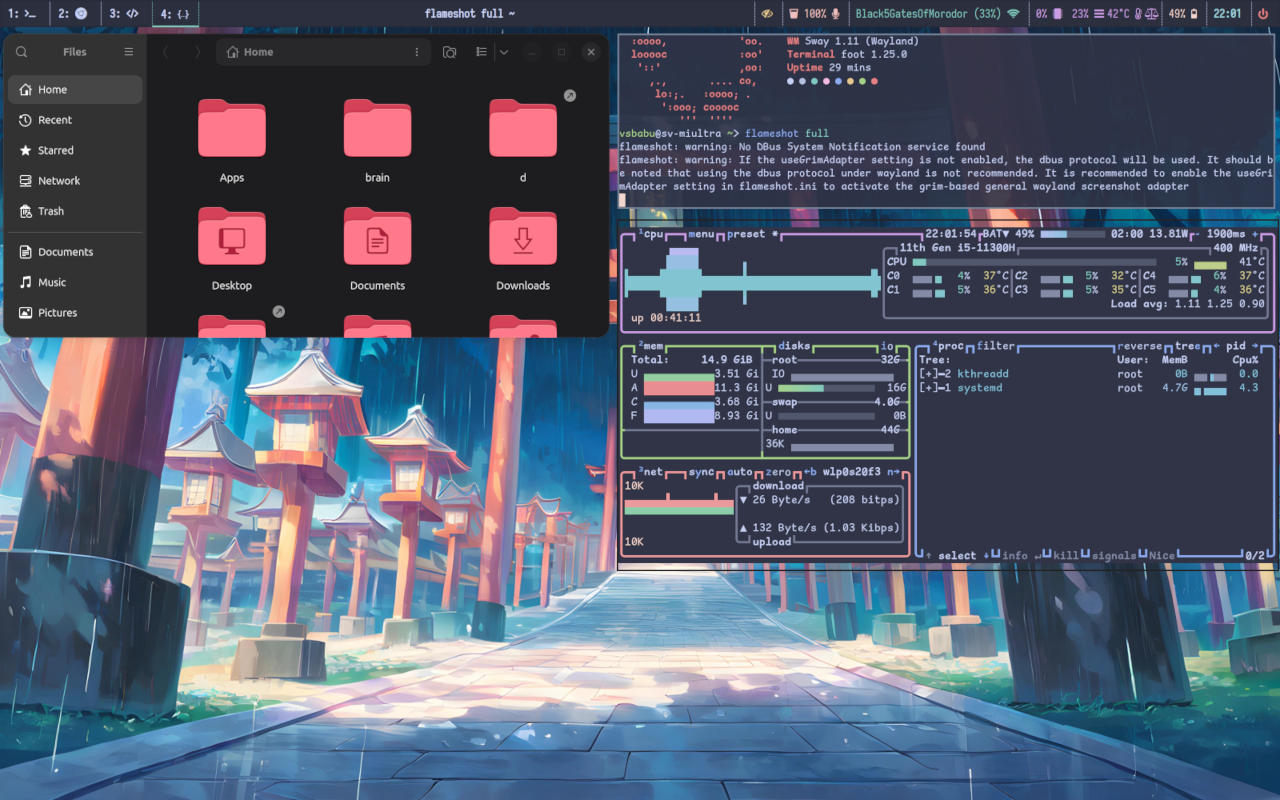
sudo apt install
   sway sway-backgrounds  swayidle swaylock  \   # main packages
   foot foot-themes                          \   # nice light terminal
   fuzzel                                    \   # Super+space launcher
   wlr-randr xdg-desktop-portal-wlr          \   # qrandr for wayland
   waybar                                    \   # top bar utility
   playerctl                                 \   # media control for waybar
   libplayerctl-dev gir1.2-playerctl-2.0     \   #  with dependencies
   python3-gi                                \
   pavucontrol                               \   # volume control utility
   network-manager-applet                    \   # without firing up gnome/unity
   grim                                          # screenshot cli
Configs are available on Github as follows sway, foot terminal, fuzzel launcher, waybar
To uninstall, just run the same command changing install with purge followed by sudo apt autoremove.